
Unit of scale
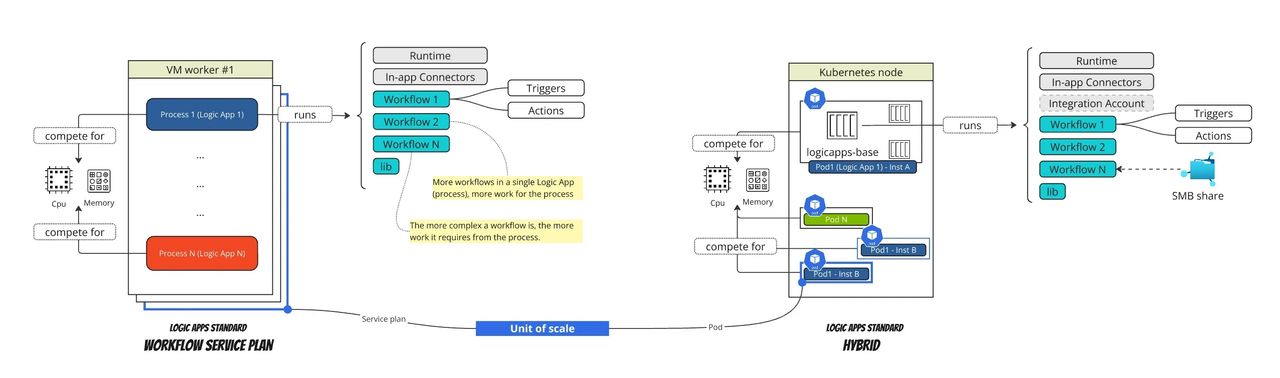
A Logic Apps Standard is a logical unit that runs one or more workflows the same way no matter the hosting model.
When running on a workflow plan, each logic apps is managed by a dedicated process on the VM worker instance (1 logic apps, 1 process, N workflows). As load increases, it first scale in-process leveraging the thread-pool and then when the available resources are under pressure, it scales out by adding additional Workflow Plan instances. The unit of scale is the Workflow Plan, making this scaling model an important factor when deciding how to group workflows, how many workflows to include in the plan, and which hosting plan size to choose.
When running workflows on Kubernetes using the Hybrid model, the unit of scale changes. It is no longer the plan but the pod. Additional instances of a given pod can be scheduled on the same node or on different nodes depending on the available resources and the placement rules.
Manual scaling
Built on top Azure Container Apps, Logic Apps Hybrid allows to define min and max replicas. You can manually scaling out by changing the min amount of instances.
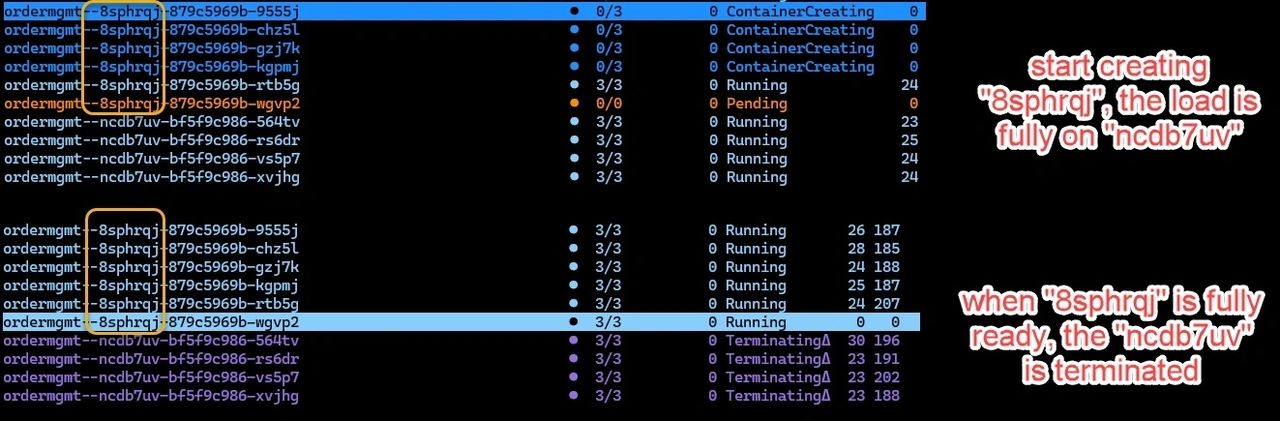
Logic Apps Hybrid leverages the single revision mode which implements deployments as rolling update with full overlap meaning the new instances are created first before any old instances are removed. The existing revision continues to receive 100% of the traffic until the new revision is ready.
Bottom line:
- There is no downtime: Since the new instances are created before removing the old ones, the application remains available.
- Double resource usage (temporarily): Since 100% of the new instances are created before removing the old ones, this momentarily doubles resource consumption.
The following image shows the state evolutions two revisions where the “8sphrqj” is taking over the “ncdb7uv”.
Auto-scaling
Being able to easily scale out an application is great, but the true nirvana of performance, efficiency, and cost-effectiveness is automatically scaling it out and back in based on events.
Azure Container Apps leverages KEDA (Kubernetes Event-Driven Autoscaling) to automatically scale out Logic Apps workflows based on event-driven triggers, such as HTTP traffic, Queue depth, custom metrics and more.
KEDA uses the ScaledObject resource to define how a workload should scale based on external events. The ScaledObject specifies the trigger type (e.g. Azure Service Bus), the scaling behavior (min/max replicas, cooldown periods), and the connection to the target workload (e.g. a Kubernetes Deployment).
KEDA will then leverage the Horizontal Pod Auto-scaler (HPA) to adjust the number of Logic Apps pod replicas based on real-time workload demand. By continuously monitoring execution metrics and scaling events, this mechanism ensures optimal performance, resource efficiency, and high availability.
Let’s look at the ScaledObject that has been automatically created when we deployed a Logic Apps (ordermgmt). You can notice that three scalers have been configured :
- activator
- http-scaler
- logicapps-scaler
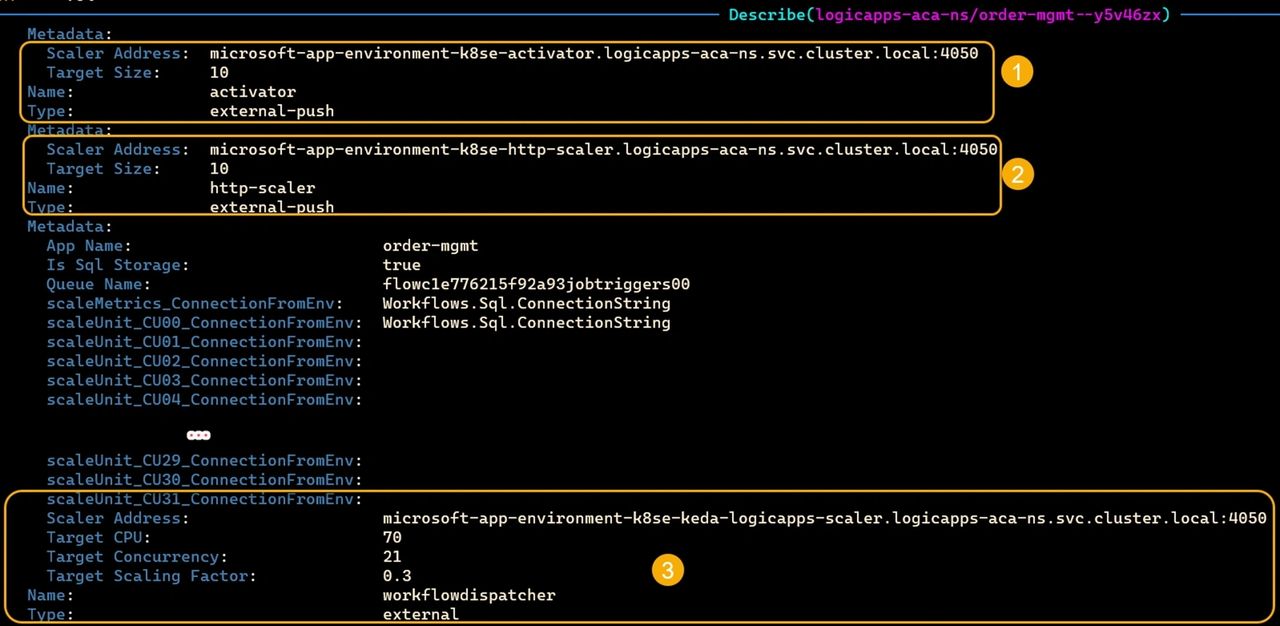
Notice the three scalers are of the type external. External scalers, are custom components that allow scaling based on event sources that are not natively supported by KEDA. The following image shows how the KEDA operator interacts with the external scalers to determine if scaling is required. The external scalers respond with a metric value or a boolean indicating whether scaling should occur.
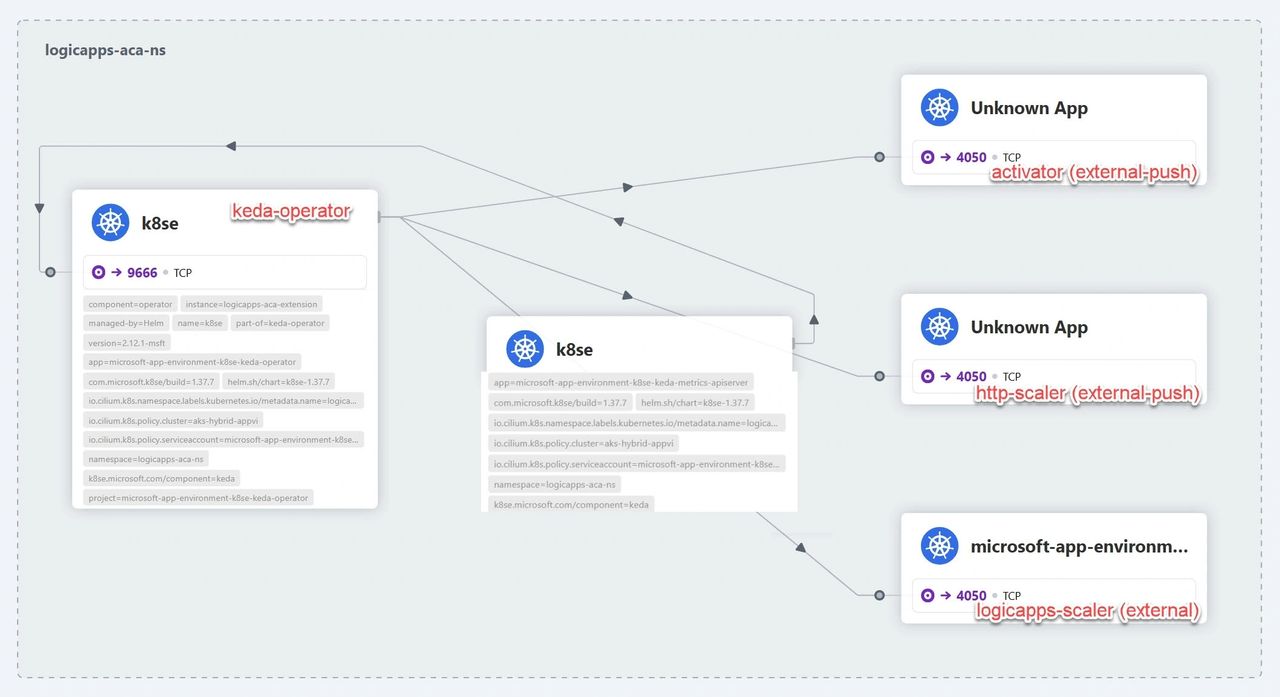
It’s useful to notice that Logic Apps Hybrid uses both external push and external (pull) scaler types.
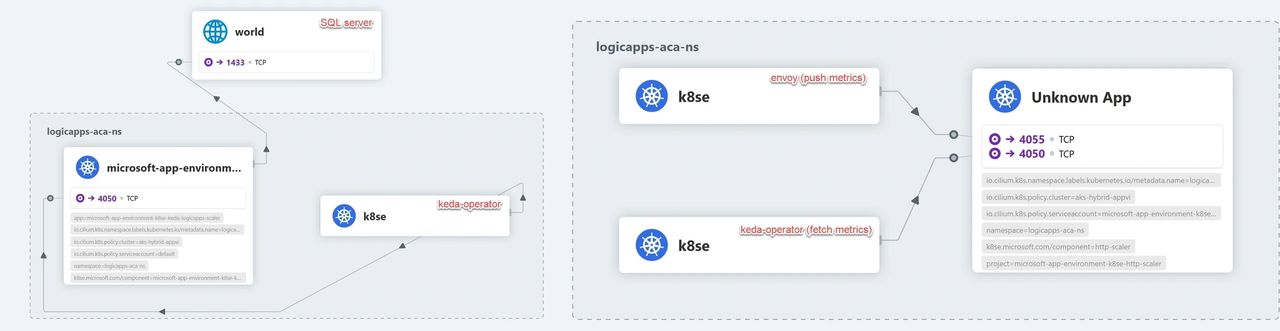
The following image, generated with Hubble UI, shows the difference between the logicapps-scaler (external) on the left and the http-scaler (external-push) on the right. The logicapsp-scaler pull the metrics from SQL server while the metrics used by the http-scaler are directly pushed by the envoy ingress component.
Auto-scaling in Action
Let’s now look two auto scalers in actions.
The LogicApps scaler
The ‘logicapps-scaler’ uses the target-based scaling mechanism to determine the optimal number of pod replicas required to process jobs across the job queue(s). It does this by fetching Logic Apps metrics collected on SQL Server and returning the calculated number to the KEDA operator, which then makes the scaling decision.
To learn more about the target-based scaling mechanism, check out this article.
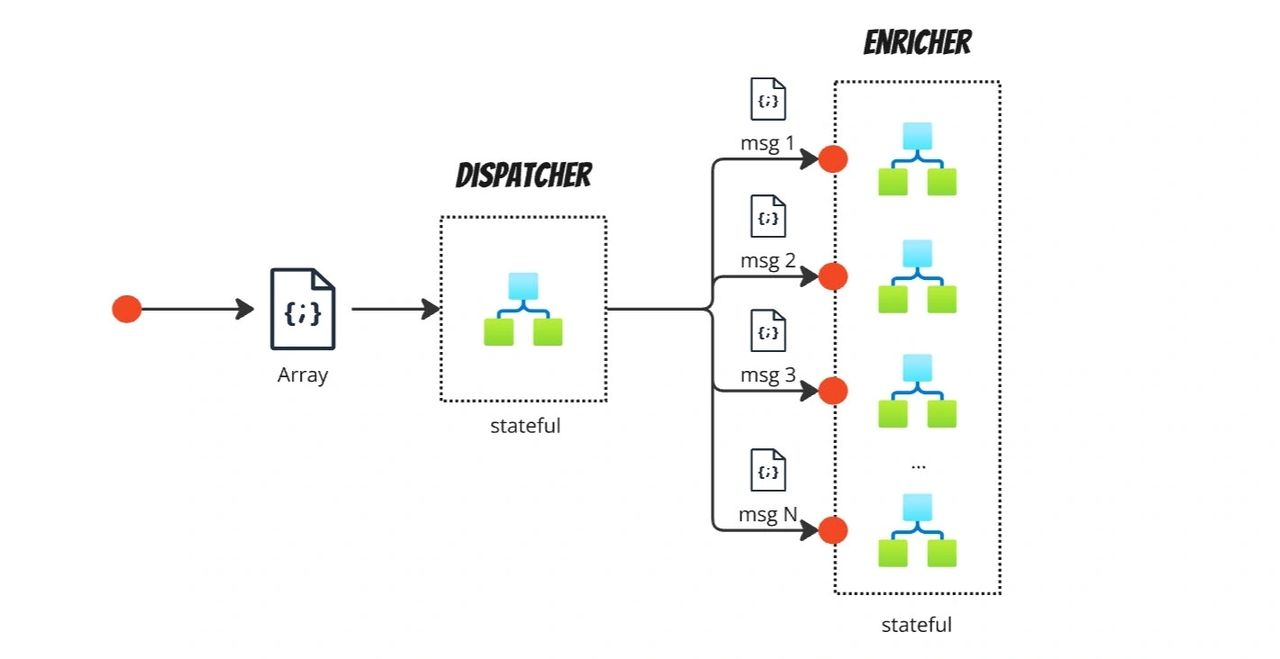
To test this scaler, we deployed a stateful dispatcher that debatches incoming JSON messages and invokes N stateful enricher workflows. Both the dispatcher and enricher workflows are hosted within a single Logic App called ‘ordermgmt.’ In short, a few incoming messages can generate a significantly larger volume of messages to be processed, increasing pressure on the Logic Apps job queues.
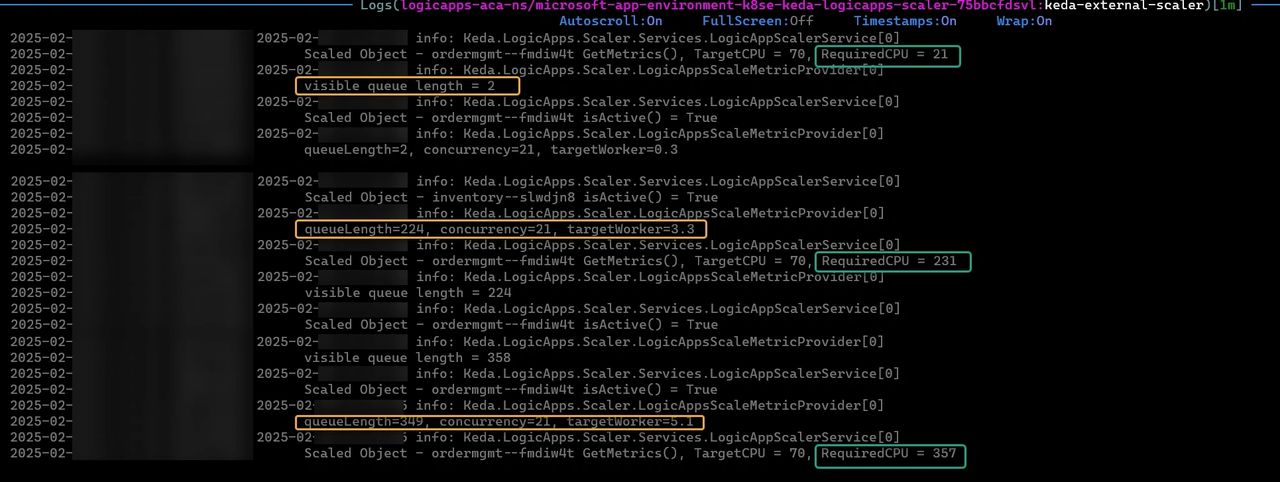
We started our test with 2 instances of the ‘ordermgmt—fmdiw4t-65d6645f49’ pod, then we triggered some load. If we look into the scaler logs where we can notice :
- the Logic Apps queue length is increasing from 2 to 224 and then 349 jobs.
- the cpu needed to manage the workload is increasing over time.
- the logic apps scaler return to KEDA the required number of workers (pods), first 3.3 then 5.1
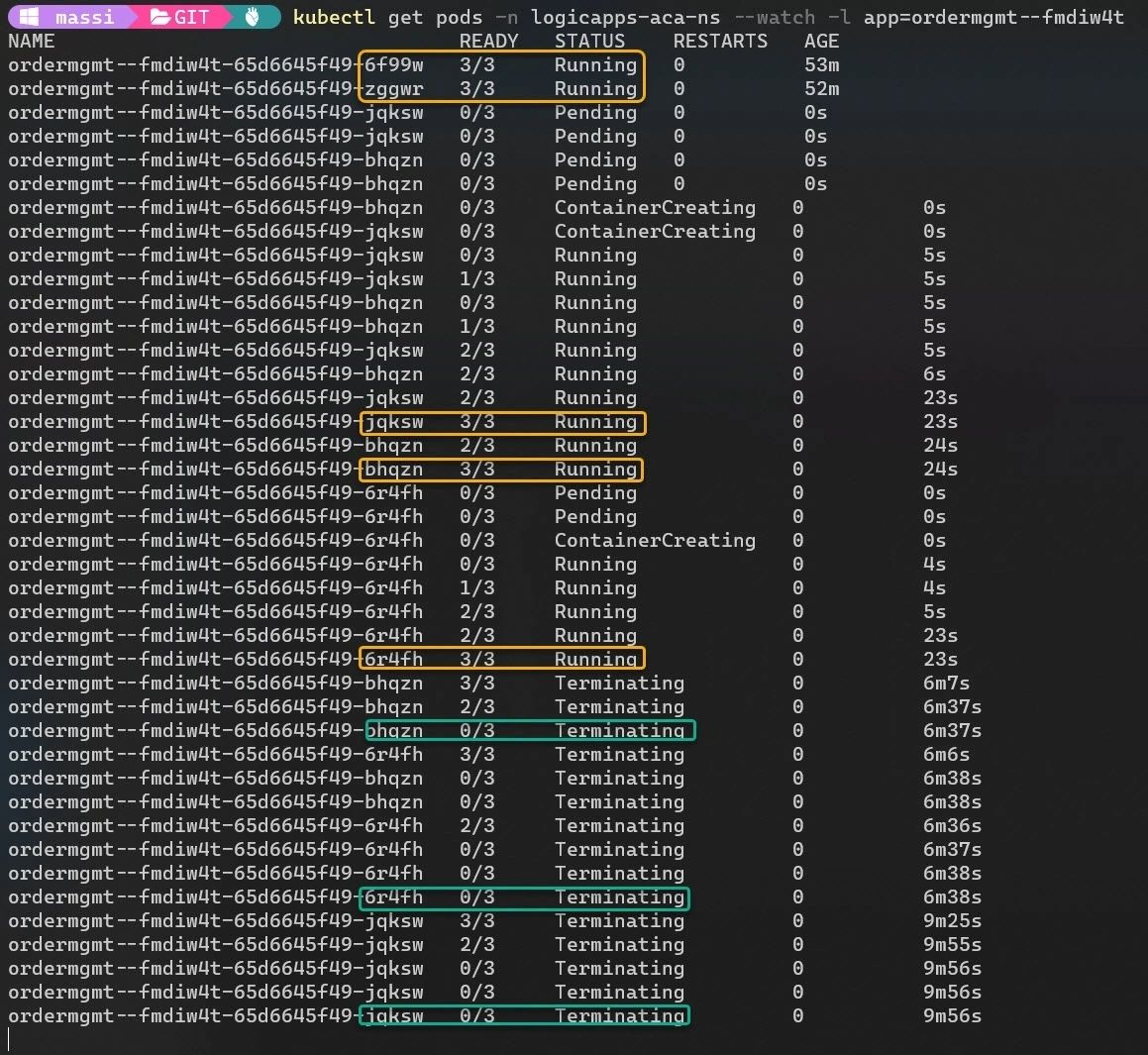
With information from the Logic Apps scaler, the HPA updates the existing Kubernetes deployment to adjust the number of pods. This method of scaling out is highly efficient and cost-effective because it is fast and minimizes resource waste.
Once the peak load has passed, the deployment will scale back to the minimum number of replicas.
The HTTP scaler
The “scaler-http” scaler takes scaling decision based on the concurrent HTTP requests measured on the envoy ingress component.
To test this scaler we deployed the “inventory” Logic Apps with a stateless workflow that is triggered by an HTTP request.
Note the HTTP scaler is not yet configurable from the Azure Portal and in the current version of Logic Apps Hybrid it is configured by default to scale out when there are more than 10 concurrent http connections.
Let’s put some load and check the scaler’s log.

As expected, our Logic Apps scaled out and back in once the traffic peak decreased.

Note that scaling to zero instances is not allowed, even though the underlying technologies powering Logic Apps Hybrid support it.
Conclusion
Scaling is a critical aspect of running hybrid applications efficiently across cloud and edge environments. Through our tests, we observed how different scalers work and how seamlessly they adjust our application’s configuration. Thanks for reading, and happy scaling, everyone!
Photo by Thomas Kelley on Unsplash