
Running Traefik on Azure Container Apps
Recently I’ve built a simple demo API where every resource was hosted in a separated Azure Container Apps. In order to better control what to expose to our consumers and what not, to make the API easy to consume and to implement cross cutting concerns like throttling I used the Azure APIM self-hosted gateway as reverse proxy as per the image below.
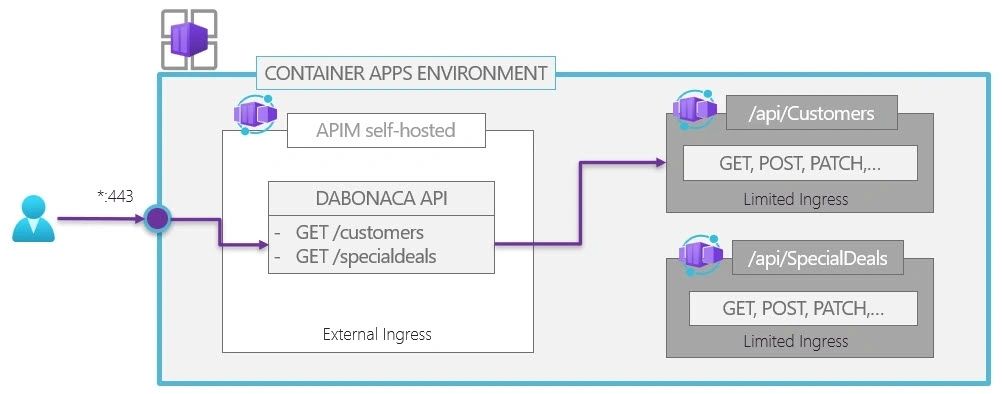
In this article we will see how to replace the APIM self-hosted gateway with Traefik, a leading reverse proxy and load balancing solution designed to handle web traffic across multiple services and containers in modern, dynamic environments. It acts as a gateway between clients and backend services, providing routing, SSL/TLS termination, and traffic management capabilities.
For this solution we will leverage the File Provider to manage the Traefik static and dynamic configuration.
Why you might want to replace the APIM self-hosted gateway? Mainly for cost reasons or to leverage advanced features like circuit breaker and gRPC.
Few steps to achieve our target setup:
- Create a storage account : https://github.com/MassimoC/aca-traefik-ingress/blob/1842d37ecacfd584b1e0dfe9aa0bddce6c303543/src/aca-traefik-deploy.sh#L42 and create a file share for static and dynamic configuration.
- Upload the configuration files in the file shares.
- Create an azure container apps environment and connect the file shares to it :https://github.com/MassimoC/aca-traefik-ingress/blob/1842d37ecacfd584b1e0dfe9aa0bddce6c303543/src/aca-traefik-deploy.sh#L115
- Run Traefik on Azure Container App by deploying the bicep file.
- Make sure to mount the volumes for static and dynamic configuration : https://github.com/MassimoC/aca-traefik-ingress/blob/1842d37ecacfd584b1e0dfe9aa0bddce6c303543/src/bicep/traefik.bicep#L33 The mounted path for the dynamic configuration should match what defined in the static configuration file.
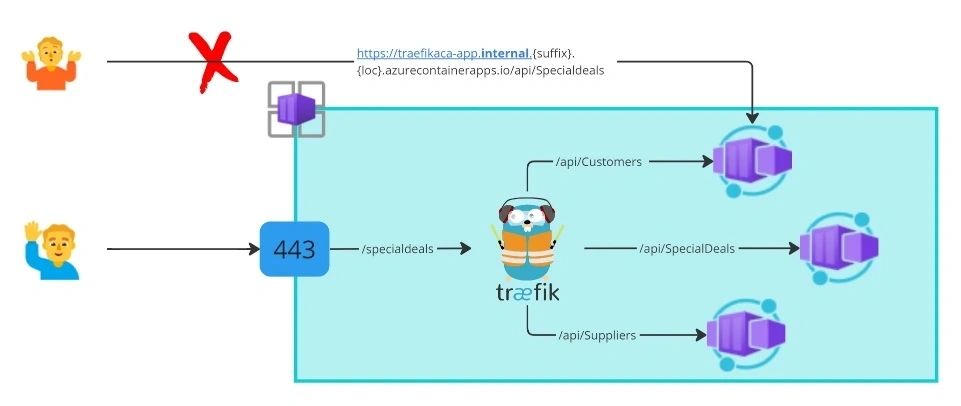
Traefik allows to chain different middlewares to tweak the requests before they are forwarded to the backend services (or before the answer from the services are sent to the clients). I am impressed on how easy and intuitive is to implement a throttling policy by using the RateLimit middleware. Just few config lines and you are ready to go!
In conclusion, running Traefik on Azure Container Apps offers a powerful and flexible solution for managing and routing traffic to your containerized applications. By leveraging the scalability and ease of deployment provided by Azure Container Apps, combined with the advanced features and functionality of Traefik, you can effectively streamline your application delivery process and enhance your overall application performance.
Photo by Aleksandr Popov on Unsplash