Running Data API Builder on Container Apps
Azure Container Apps is the easiest way to run a container on the Microsoft cloud.ACA provides a higher-level abstraction over containers, enabling developers to deploy multi-container applications without having to worry about the underlying Kubernetes infrastructure. Actually the underlying AKS is completely transparent to the ACA developers!
In a previous post we explored how to start with Data API Builder, in this one we will see how to run our API using Azure Container Apps.
Before starting make sure you have generated the dab-config.json file by running the ‘dab init’ and ‘dab add’ commands.
You can get our DAB API running on Azure Container Apps with few steps:
- create a Storage Account and a File share.
- upload the dab-config.json file to the File share.
- create a Container Apps Environment.
- link the azure file share on the Container Apps Environment
- run a bicep file to create the Container Apps the run the DAB image by reading the configuration file from the mounted file share.
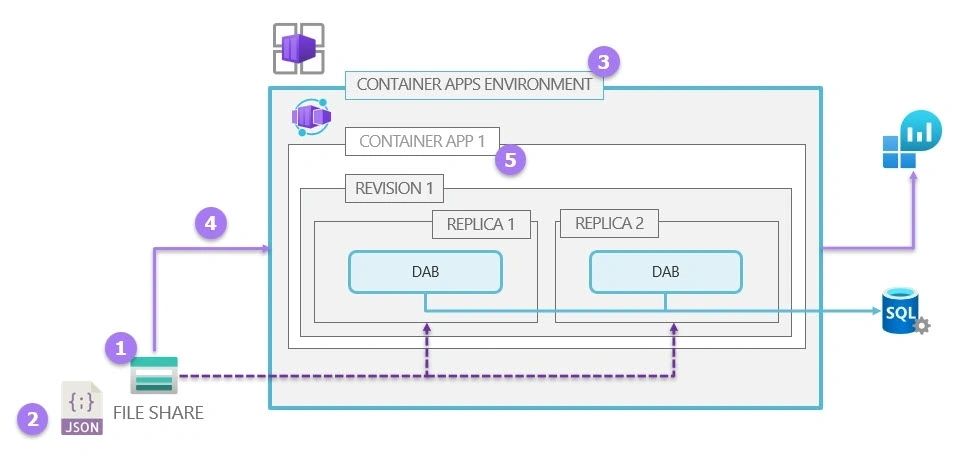
You can try this out yourself by running the example I posted on the DAB repository on GitHub : https://github.com/Azure/data-api-builder/blob/main/samples/azure/azure-container-apps-deploy.sh
Let’s have a look at the bicep file that creates the container apps https://github.com/Azure/data-api-builder/blob/main/samples/azure/bicep/dab-on-aca.bicep
The key points are:
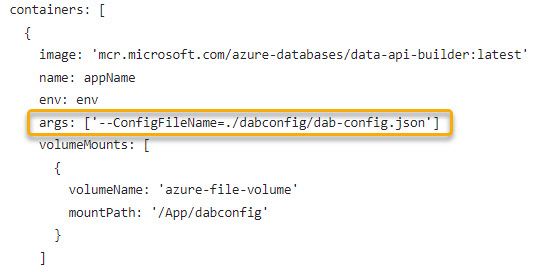
- specify the volumes to provide for the revision in .properties.template.volumes and declare where to mount those volumes into containers in properties.template.containers[*].volumeMounts. Mounth the following path : /App/{foldername}
- run the container image from the MCR registry and specify the config file name by passing the DAB config file name via the args string array.
Running containers with Azure Container Apps is simple and straightforward, allowing you to deploy and manage containerized applications with just a few commands. By combining Data API Builder and ACA we saw how to quickly turn your data into a serverless API.
Photo by Mediamodifier on Unsplash