Over the last few months, I’ve spent quite a bit of time playing with sandboxes, microVMs, agent runtimes, and pretty much anything that promises to safely execute code produced by increasingly autonomous agents.
One service that particularly caught my attention is Azure Container Apps Sandboxes.
Microsoft describes Azure Container Apps Sandboxes as isolated compute environments designed for workloads such as coding agents, AI-generated code execution, development environments, and other workloads where running arbitrary or untrusted code is part of the experience.
Each sandbox is an isolated lightweight virtual machine. Microsoft also describes the service as providing hardware-isolated microVM boundaries, sub-second startup, suspend and resume, OCI image support, and full memory and disk snapshots.
Those characteristics raise an interesting question: What might actually be happening underneath?
Microsoft does not reveal every implementation detail of the service, so this article is intentionally an architectural thought experiment.
Some parts are documented facts. Some are deductions based on behavior the platform exposes. Others come from conversations and discussions around the technology at conferences and community events. And some are simply the design choices I would expect to find in a system providing these characteristics at Azure scale.
So, let’s imagine the internals.
First : what exactly is a sandbox?
The word sandbox gets used almost everywhere today.
- A process can be sandboxed.
- A browser tab can be sandboxed.
- A container can be sandboxed.
- A virtual machine can be sandboxed.
But when thinking about agentic workloads, I find it useful to think of an agent sandbox as providing two boundaries: a security boundary and a lifecycle boundary.
A security boundary
The first one is obvious. We want code running inside the sandbox to have a very hard time escaping from it. This becomes especially important when an agent generates code dynamically and you must treat it as untrusted.
Imagine an agent doing something like this.
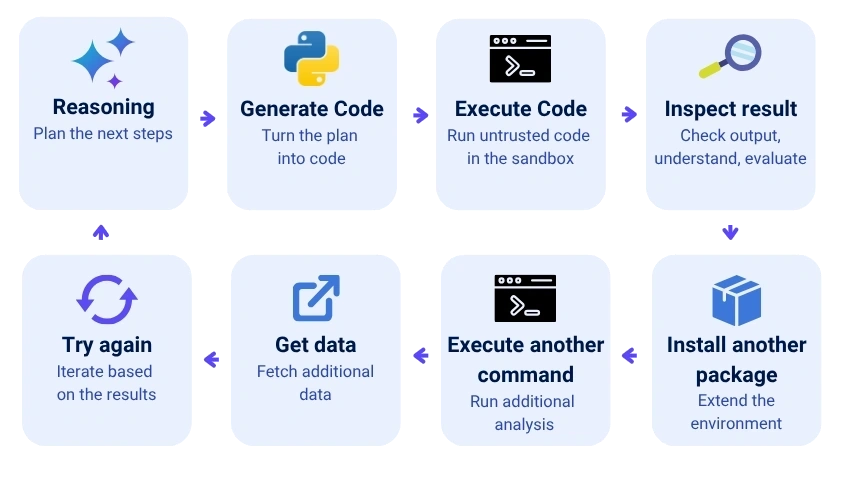
At that point, executing generated code inside the same operating-system boundary as your application is probably not a great idea.
But isolation is not only about preventing code from escaping the runtime.
An agent may also have access to credentials, tokens, tools, APIs, or network connectivity. If the execution environment can freely reach internal services, metadata endpoints, databases, or other parts of the network, then untrusted code doesn’t necessarily need to escape the runtime to become dangerous.
So the boundary also needs to define what the workload can access: which credentials are exposed, which services it can reach, and where network traffic is allowed to flow.
Containers provide namespaces, cgroups, and other isolation primitives, but containers fundamentally share the host kernel. Virtualization gives us another boundary. Each workload gets its own guest kernel, memory space, and virtualized devices.
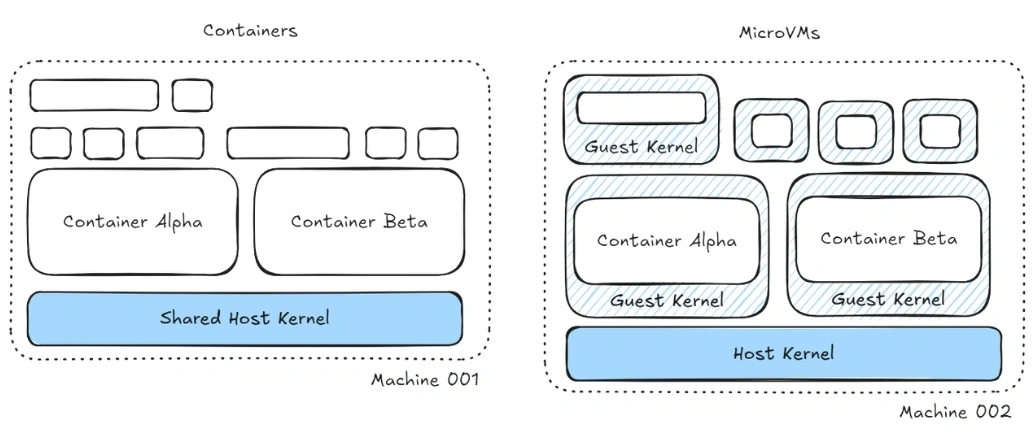
Azure Container Apps Sandboxes explicitly target this stronger isolation model: Microsoft describes each sandbox as an isolated lightweight VM and, in its Build 2026 announcement, as running inside a hardware-isolated microVM boundary.
But security is only half of the story.
A sandbox is also a lifecycle boundary
This part, in my opinion, is even more interesting.
Traditional web apps tend to have relatively predictable lifecycle models: A web application starts; it serves requests. Eventually it stops.
An agent workspace behaves differently. An agent may work for 30 seconds, disappear for ten minutes, come back, execute some commands, leave again, and return hours later.
During all this time, we may want to preserve:
- files;
- installed packages;
- processes;
- memory;
- working directories;
- intermediate results;
- potentially the complete execution environment.
Azure Container Apps Sandboxes model this explicitly.
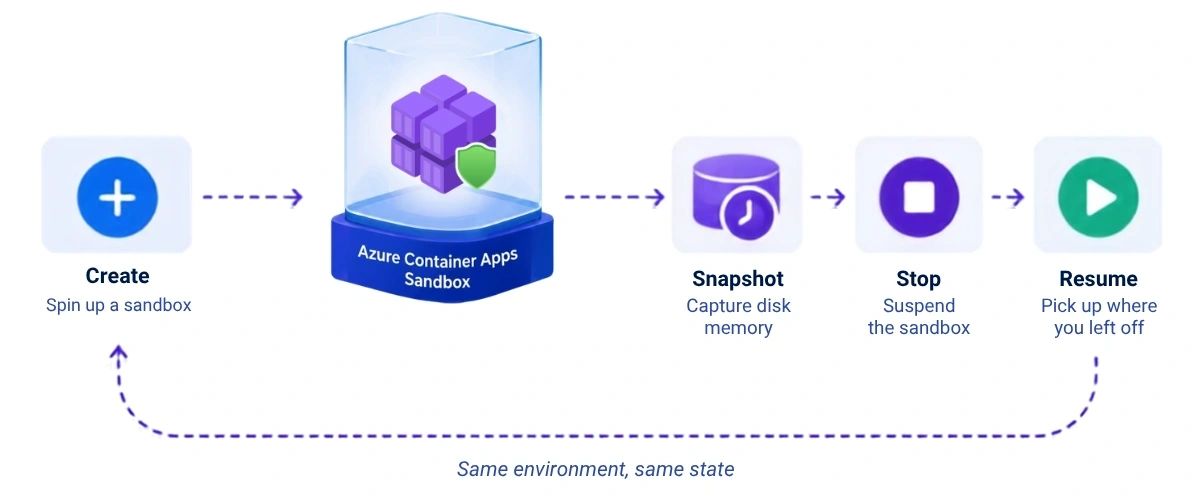
A sandbox can be running or stopped. When suspended using memory mode, the platform preserves both memory and disk. This means the sandbox becomes more than disposable compute; It becomes an execution context with a lifecycle. That’s extremely useful for agents.
What Azure Container Apps Sandboxes give us
From a developer perspective, the programming model is surprisingly simple.
You create a sandbox. You execute commands. You read and write files. You can expose ports. You can attach storage. You can snapshot the machine. You can stop it. And later you can resume it.
The important thing is what you do not manage.
- You don’t provision a VM.
- You don’t configure a hypervisor.
- You don’t manage host machines.
- You don’t manage a Kubernetes node.
- You don’t create a VM scale set.
- You don’t care where the machine physically runs.
That is the real value of the managed service: all of that complexity is hidden behind the Sandbox control plane. An Azure Container Apps Sandbox, therefore :
- feels less like infrastructure you have to operate and more like a new compute primitive: create your isolated environment, run something inside it, suspend it, resume it, and eventually throw it away.
- Additionally, it allows OCI container images to become the root filesystem of a sandbox. In other words, the container image isn’t necessarily executed as a conventional container; it can be converted into the disk image used by the isolated VM. That is a very interesting bridge between the container packaging model and the virtual-machine isolation model.
- can also be locked down from a networking perspective, using policies to control outbound traffic and restrict which external or internal destinations the sandbox is allowed to reach.
So what could be underneath?
Behind every sandbox request lies a carefully orchestrated sequence of control-plane operations, scheduling decisions, storage preparation, networking, and hardware virtualization.
Conceptually, I imagine the architecture looking something like this:
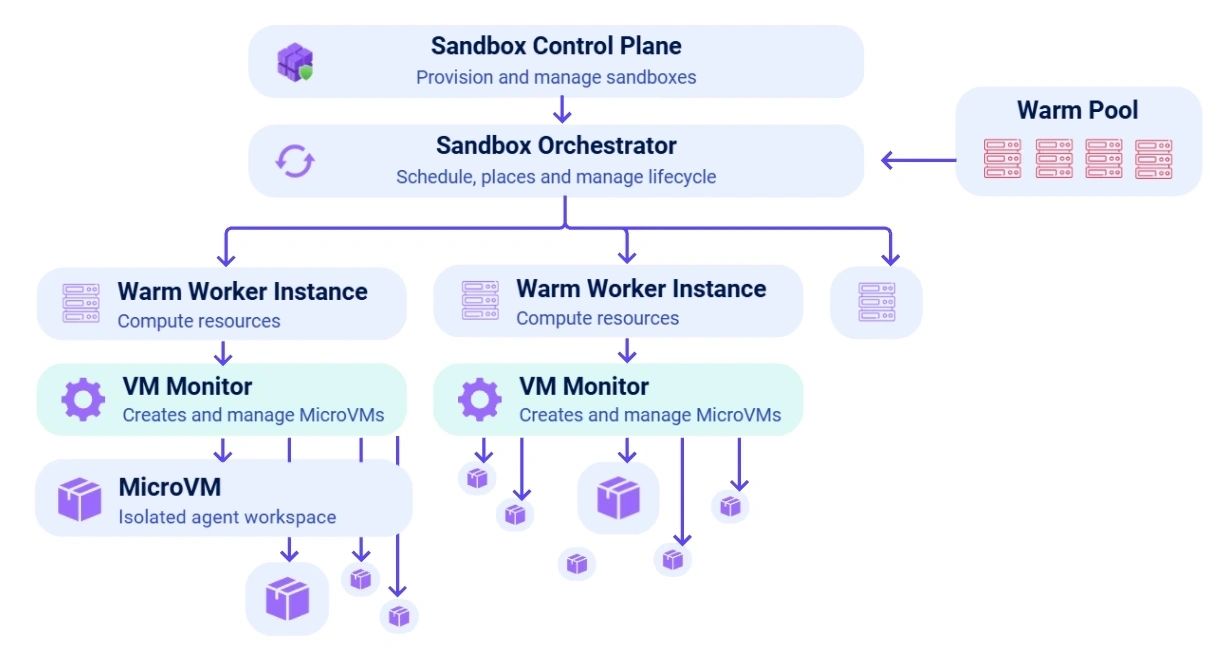
The exact Azure implementation is not publicly documented at this level. But based on the capabilities exposed by the service, something underneath has to perform a number of core jobs:
- find available compute;
- create an isolated MicroVM;
- attach its filesystem;
- configure networking;
- start its guest kernel;
- track its lifecycle;
- capture memory and disk;
- release compute when it is idle;
- restore everything when execution continues.
To reason about how such a platform could work, let’s zoom in on two particularly interesting components: the VMM that creates and runs the microVMs**, and the sandbox orchestrator** that manages everything around it.
Which VMM could be used by ACA Sandboxes?
The first question is obvious: which Virtual Machine Monitor could Azure be using to spin up these microVMs?
One candidate that comes to mind is Hyperlight. It is lightweight, fast, and specifically designed for secure execution of untrusted code. But Hyperlight exposes a much more constrained execution model. Azure Container Apps Sandboxes, on the other hand, provide a richer VM-like environment: a filesystem, OCI-based root images, networking, processes, suspend and resume, and memory-and-disk snapshots. That makes Hyperlight an interesting sandboxing technology, but probably not a fit for the kind of full microVM lifecycle exposed by ACA Sandboxes.
What about Firecracker? Firecracker is probably the best-known microVM VMM. It was designed for serverless workloads and is optimized for fast startup, low overhead, and a minimal device model. Architecturally, it looks like a very plausible candidate.
One important catch, though: Firecracker is built around KVM. Azure’s physical infrastructure is based on the Microsoft hypervisor stack, and Microsoft exposes MSHV as the corresponding userspace hypervisor interface in this ecosystem. Firecracker does not provide an MSHV backend today.

So if I had to place a bet, it would be Cloud Hypervisor.
Why? Cloud Hypervisor was built specifically for modern cloud workloads. It aims for a small attack surface, fast startup, low memory overhead, and minimal device emulation. More importantly for this discussion, it supports both KVM and MSHV as hypervisor backends. Another clue is that Microsoft engineers have been active contributors to the Cloud Hypervisor project, particularly around the Microsoft hypervisor ecosystem.
None of this proves that Azure Container Apps Sandboxes uses Cloud Hypervisor internally. Microsoft has not publicly documented the VMM implementation at that level.
Still, given the service requirements like lightweight microVMs, a rich Linux guest environment, snapshotting, fast lifecycle operations, and integration with Microsoft’s hypervisor stack, Cloud Hypervisor fits remarkably well.
The underlying architecture : Nested virtualization and MSHV
If that hypothesis is roughly correct, the next question becomes: where do these microVMs actually run?
Starting a completely new Azure VM from bare metal for every sandbox request would not match the startup characteristics exposed by the service.
A more plausible architecture is a fleet of warm Azure worker instances capable of creating additional hardware-isolated guests through nested virtualization.
Conceptually, that would look like this:
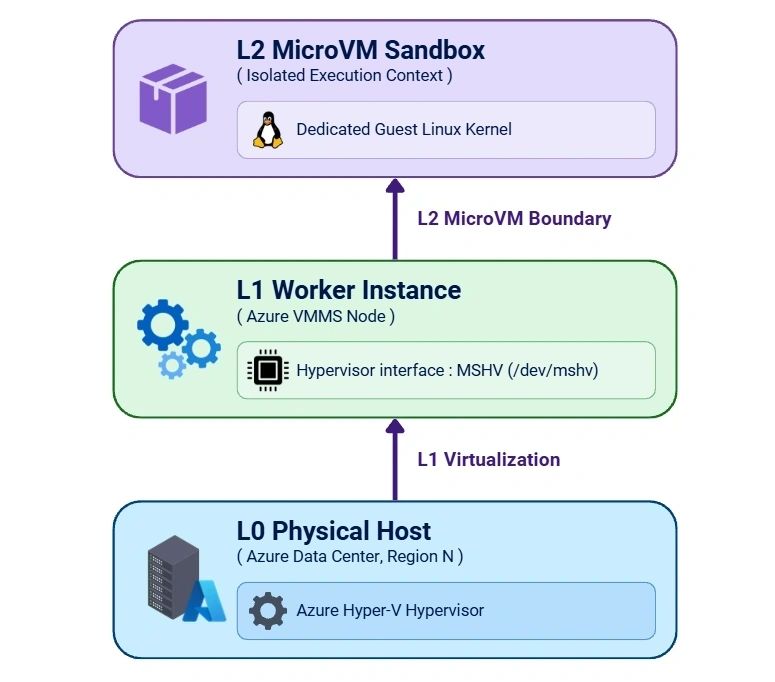
This gives us two interesting layers:
- The L1 Worker Host: A fleet of Azure Linux instances managed via VMSS that handles pool scheduling, networking injection, and runtime management.
- The L2 Sandbox: A hardware-isolated microVM partition created inside that worker and dedicated to one sandbox execution context.
Crucially, this boundary is enforced by a Hyper-V hardware isolation boundary using Microsoft’s userspace hypervisor interface (MSHV). Even though code inside the sandbox sees a standard Linux kernel, the boundary separating it from the rest of the node is enforced at the CPU virtualization level. If untrusted agent code exploits a guest kernel vulnerability, the failure remains fully contained within its own L2 guest kernel. That balance is what makes the microVM model so compelling for agentic workloads: container-like packaging and developer experience, with hardware-isolated boundaries underneath.
The sandbox orchestrator and the cold boot
Even if your virtual-machine monitor can instantiate the VM extremely quickly, booting and initializing everything above it still takes time.
Yet Azure Container Apps Sandboxes advertises sub-second startup and resume behavior. So somewhere in the system we need to avoid doing all that work repeatedly.
Which brings us to one of the oldest performance tricks in computing: do the expensive work once.
Step 1: the Golden snapshot
Azure documentation confirms that sandboxes are provisioned from prewarmed pools and are available almost instantly. However, it does not expose how those pools are implemented internally. So what kind of mechanism could be behind that experience?
Imagine preparing a sandbox by booting the kernel, initializing the operating system, mounting the filesystem, configuring the runtime, installing or loading the application dependencies, and starting the sandbox agent until the environment is fully ready.
Now freeze that initialized environment and capture its state. That captured state becomes a golden snapshot.
Instead of booting a new environment from scratch, a new sandbox could conceptually start from something much closer to: restore the golden snapshot → apply sandbox identity → configure networking → execute the workload.
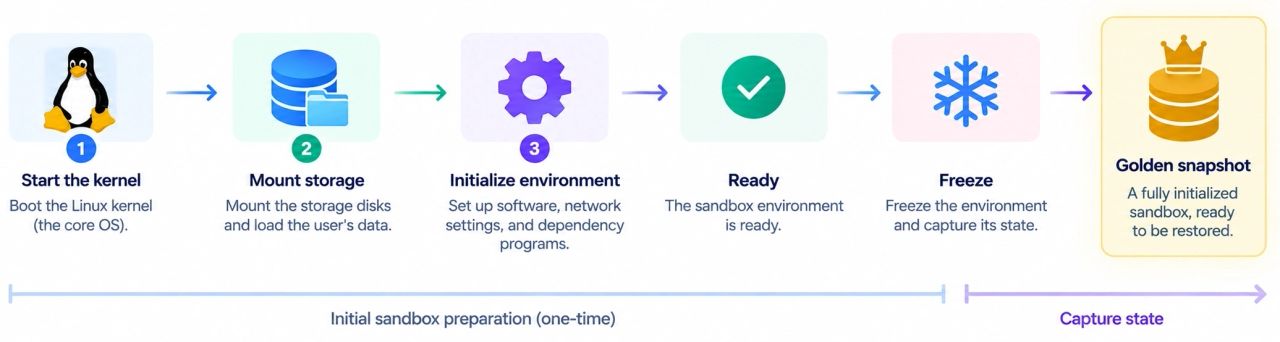
That changes the problem dramatically.
The platform is no longer trying to make a full Linux boot impossibly fast. It is trying to make snapshot restoration and final sandbox preparation extremely fast.
Note: This fits beautifully with Foundry Hosted Agents: each user session gets a fresh isolated microVM, potentially restored from a golden snapshot so it can become ready almost instantly.
Step 2: user snapshots
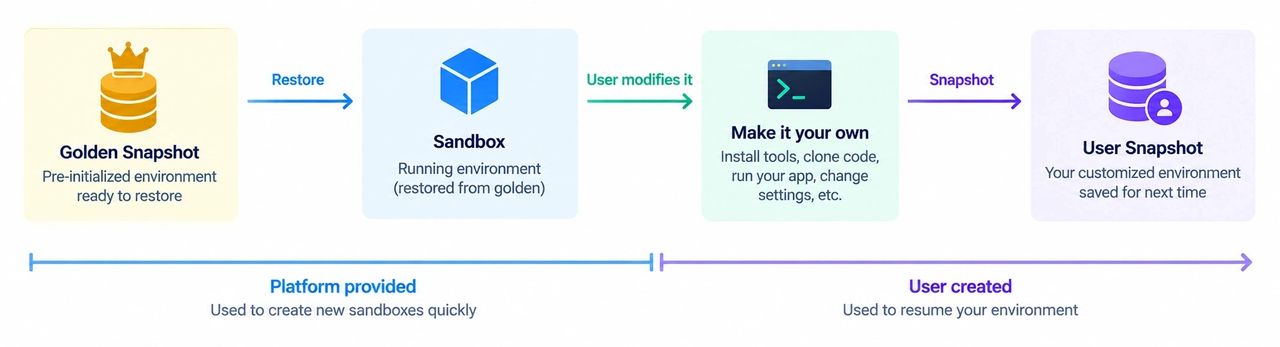
Now suppose the platform gives me a fresh agent environment by restoring a sandbox from a golden snapshot. Lovely!
- I start working.
- I clone a repository.
- I install packages.
- The agent use skills that create files, run scripts, fetch data and more.
- The agent spins up additional processes to perform the work that needs to be done.
Then I stop the sandbox. When I come back, I expect all of that to still be there. Azure Container Apps Sandboxes can preserve both disk and memory, which means the environment can resume with its filesystem, processes, and in-memory execution state preserved. So conceptually, we now have two very different kinds of snapshots:
- The golden snapshot is optimized for creating environments quickly.
- The user snapshot is optimized for continuing an existing environment.
Step 3: snapshotting is not enough
Let’s say that stopping our MicroVM and dumping 4 GiB of RAM somewhere is conceptually straightforward. But restoring it in sub-second time is another matter. If restoring requires downloading multiple gigabytes from remote object storage before the VM can run, your sub-second resume disappears immediately.
That means snapshot performance becomes largely a storage architecture problem.
The platform needs snapshots to be:
- durable;
- cheap enough to store;
- fast to retrieve;
- potentially distributed across hosts;
- accessible with extremely low latency.
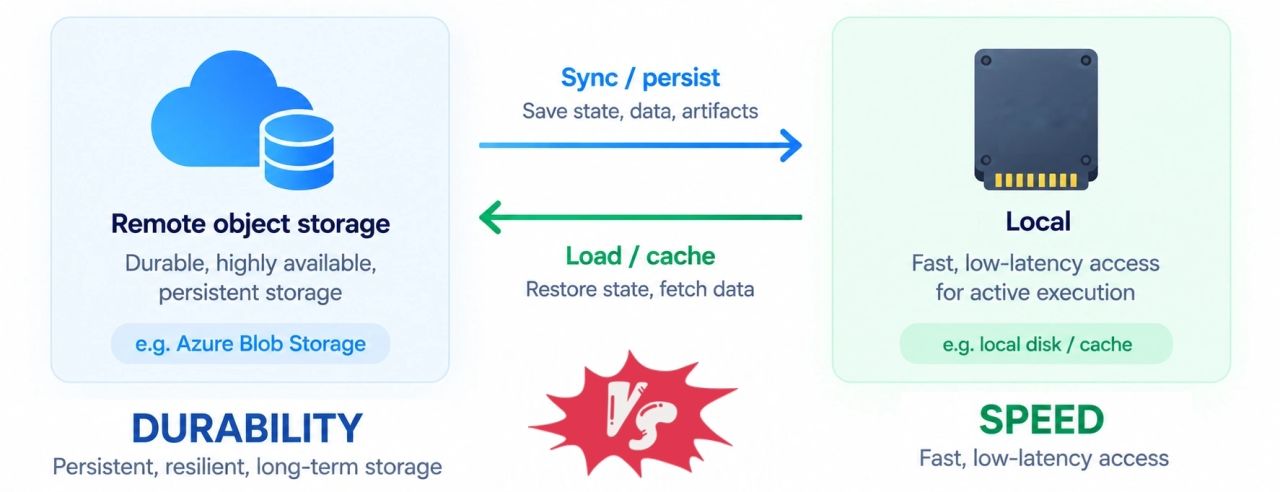
This creates an interesting tension.
- Keeping every snapshot permanently on local storage is fast but expensive and ties the sandbox to a particular host.
- Keeping everything only in remote storage provides great durability and mobility, but it may hurt resume latency.
So I would expect some form of tiered snapshot architecture and perhaps the entire snapshot doesn’t even need to be restored before execution begins.
Step 4 : prewarming is another part of the equation
Azure explicitly mentions prewarmed pools as part of its startup model.
That gives us another potential optimization layer.
Since sandboxes are created against predefined workload profiles in terms of CPU and memory, the platform can potentially keep matching capacity already prepared. That reduces the amount of scheduling and provisioning work required when a new sandbox is requested.
In other words, some of the expensive decisions may already have been made before the request even arrives.
Perhaps worker capacity already exists.
Perhaps VM monitors are already running.
Perhaps .. Perhaps … Perhaps 🎶
The control plane is the most valuable part
MicroVM is definitely a trend topic these days, and it is extremely interesting to see how different vendors implement sandboxes using different technologies, established and custom VMMs. Those are really fascinating technologies.
But don’t get distracted by the VMM itself: it is only one part of the product. The real platform is everything surrounding it: snapshot management, egress policies, autosuspend, prewarming, scheduling, storage, networking, lifecycle management, observability, and more.
The microVM gives you an execution boundary. The Azure Container Apps sandbox service gives you an execution platform.
Conclusion
Azure Container Apps Sandboxes sit at an interesting intersection of technologies we have known for years: virtualization, containers, serverless computing, snapshots, and distributed storage.
But agentic workloads are combining those technologies in a new way.
Agents need environments that are isolated enough to execute untrusted code, cheap enough to disappear when idle, and stateful enough to continue exactly where they left off.
That requires more than simply starting a small VM quickly.
It requires treating execution itself as something that can be materialized, frozen, moved, restored, and eventually destroyed.
And that might be the most interesting way to think about sandboxes: not as smaller virtual machines with a lifecycle, but as durable execution contexts temporarily materialized as compute.
The exact internals of Azure Container Apps Sandboxes remain Microsoft’s implementation detail.
But the capabilities exposed by the service give us a pretty good set of clues. And sometimes, imagining how a system must work is the best way to learn not just the how, but the why behind the why.