
Cron Jobs on Azure Container Apps
Jobs are processes that perform a given task and exit when finished. A Cron Job schedules that given task to run at a given schedule. For example, we can schedule a Cron Job to run once every hour or we can schedule it to run at 22:00 on every day-of-week from Monday through Friday.
In this article I want to explore how can we execute a basic scheduled job (cron job) on Azure Container Apps.
Options
Azure container apps (ACA) supports two types of workloads : apps and jobs.
- Apps are workloads that run continuously. If a replica fails, it’s restarted automatically.
- Jobs are processes that start, run for a finite duration and exit when finished. Jobs allow to specify the maximum number of retries before failing the job.
With ACA you can run Cron job (scheduled job) in two ways:
- As an ACA job.
- As an ACA app using DAPR bindings
The sample code of this exercise is available on GitHub.
A third (and more opinionated) method may become available in the near future by hosting Azure Functions on ACA ). As of the time of writing, this approach is in public preview, but it’s important to note that the cron binding feature is not yet available.
ACA Jobs
ACA jobs support three types of execution: manually initiated, based on a predetermined schedule or when an event occurs, and they are considered completed once they exit.
ACA Jobs is the most effective way to run the scheduled task because there are less moving parts and it is the most efficient from a resource consumption standpoint since the process only runs when needed.
To deploy get a Cron Job, you might follow these steps:
- Create a worker service.
- Build a container and push it to a registry.
- Deploy a “Microsoft.App/jobs” resource on your Azure Container Apps environment. Make sure to specify the Cron formatted schedule and whether to retry in case of failure.
Simple and effective, it just works! 🙌
The run history is available on the Azure Portal and the execution details stored in the LogAnalytics workspace connected to the Azure Container Apps environment.

Running Jobs as ACA apps
This is about setting up a Web.API that is executed on a schedule by the DAPR runtime.
Azure Container Apps can be instructed to inject a DAPR container alongside our web API container; on a given schedule DAPR will take care to perform a POST request to an HTTP endpoint that matches the DAPR component name (in this example http://localhost:{port}/DoTheJob).
Let’s see how to get a simple demo up and running:
- Create a Web.API. Make sure to add the Dapr.AspNetCore and the Dapr.Client packages.
- Create an endpoint that support the POST request method.
- Build a container and push it to a registry.
- Create a ‘daprComponent’ of bindings.cron type with the name that matches the Web.Api controller name.
- Create an ACA app to run the Web.API, enable the sidecar injection and configure which daprComponent to be used. Make sure a minReplica of 1 is configured otherwise the app will scale to 0 meaning there won’t be any daprd process to trigger the web API.
Once the app is deployed to ACA we can navigate to the “Scale and replicas” section to get the list of the active replicas along with the containers that are running. Note in the image below the daprd is the process that runs at a certain schedule and perform a POST to the crondapr API that execute the task.

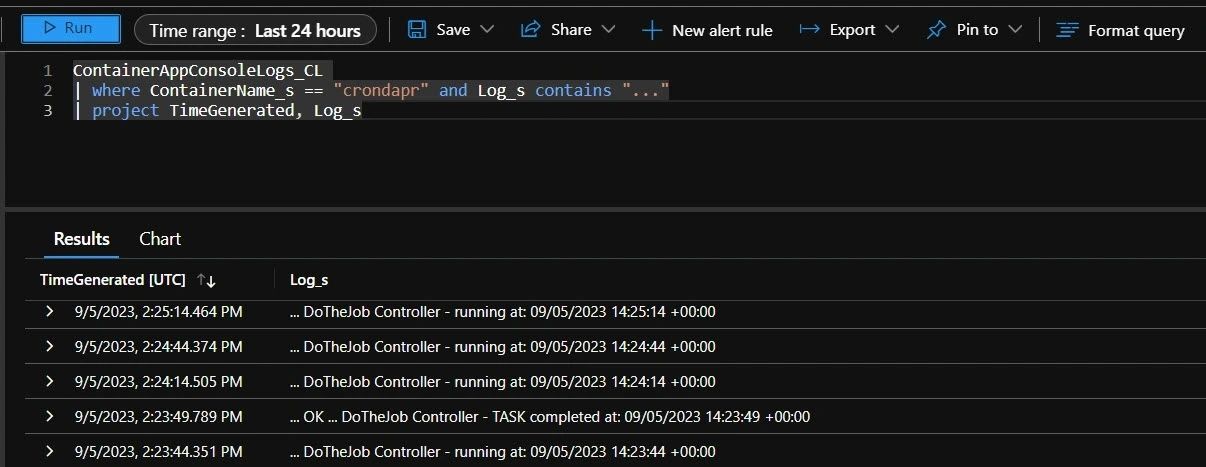
To get access to the run history and the execution details we do not have a built-in UI. To access this information, you would typically run a query on the LogAnalytics workspace connected to the Azure Container Apps environment as below.
Conclusion
Azure Container Apps offers a versatile and efficient platform for managing scheduled jobs, whether you prefer the simplicity of ACA Jobs or the versatility of DAPR. My preference goes to simplicity therefore I pick ACA Jobs : less moving parts, better resource consumption and and a useful interface to analyze the run history.
Photo by Christopher Burns on Unsplash