
Creating a no-code APIs with Data API Builder
On March 2023 Microsoft announced the public preview of Data API Builder (DAB), an open source tool that instantly turns SQL objects (and CosmosDb collections) into a modern REST and GraphQL API.
Here few highlights about the tool:
- No-code
- Supports table, views and stored procedure.
- Security built-in (Authentication, Authorization, Item-level security)
- Easily testable on localhost (using the dab cli or a container)
- Provides filtering, field selection, sorting and pagination
- Open Source
For more information check out the documentation 📃 https://learn.microsoft.com/en-us/azure/data-api-builder/ and the project implementation on GitHub 🧑💻 https://github.com/Azure/data-api-builder
On this blogpost we will see how to turn a SQL table into a REST API.
️Warning ⚠️ : be aware that directly exposing your database model is an antipattern for multiple reasons (the tight coupling with your db model, the need of select what to expose, change the datatype, performance reasons and more …). Be careful and evaluate when it makes sense to use this tool and which security practices have to be put in place before exposing data to the outside world.
How to get started?
It’s extremely simple, you just need a connection string and the DAB tool.
- Let’s start with getting the DAB on our machine.
- Create a config file by running “dab init”.
- Add an object (table in this case) to the config file with the “dab add” command.
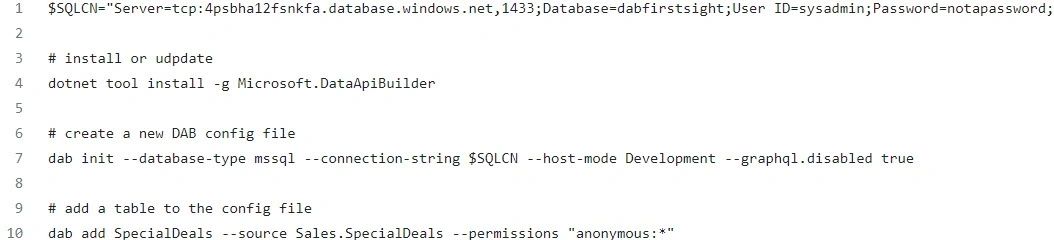
https://gist.github.com/MassimoC/da25bdc9930596c639b0647768113487#file-dab-firstsight-init
You can find the dab-config.json file generated by the DAB cli on this link.
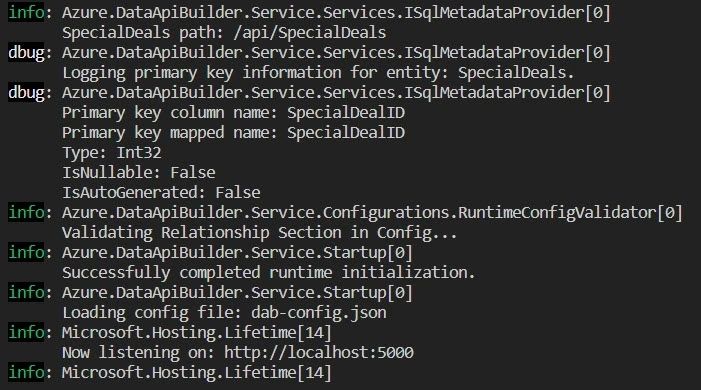
Run the “dab start” command to locally host the API. You can notice from the following application logs the DAB analyzes the table structure, identify the PK and host the APIs on the ports 5000 and 5001.
Let’s run few tests
Now the API is running let’s see which operations are available, how the URL and body is composed and which HTTP methods. Note that at the time of writing is not possible to limit the HTTP methods to be exposed.
Get all the special deals
Get a single deal (by specifying the PK name and value)
Filter the dataset
Select which field to return to the client
Create a new record (just pass a json with PK and mandatory fields)
- POST https://localhost:5001/api/SpecialDeals
{
“DealDescription”: “5% for my good friends”,
“StartDate”: “2023-01-01”,
“EndDate”: “2024-01-01”,
“DiscountPercentage”: 5,
“LastEditedBy”: 2
}
Delete a record via PK
Update a set of fields (PUT is supported as well by passing the full data object)
- PATCH https://localhost:5001/api/SpecialDeals/SpecialDealID/5
Content-Type: application/json
{
“DealDescription”: “5% discount for my good friend bob”
}
What’s next?
There is a lot more to explore for example adding views, table relationships, and more. What I found most interesting are the security features the tools supports. Here what is possible today:
- Authentication with AAD
- Authorization by specifying roles and allowing specific actions per role
- Row level filtering via policy
- Limit the returned fields (include / exclude)
This post wanted to give a first introduction about DAB and how quickly it can surface your database to developers via a REST API. Stay tuned for more!
Photo by Raimond Klavins on Unsplash